Update note: This post was written for Next.js 15. In Next.js 16 the
dynamicIOanduseCacheflags were merged into a singlecacheComponentsoption, andcacheLifeandcacheTagare now imported fromnext/cachewithout theunstable_prefix. Also, since Next.js 15,fetch()requests are not cached by default; if you want caching you need to passcache: 'force-cache'.
What Is a Cache and Why Does It Matter?
A cache temporarily stores frequently used data or content. Its goals are to stop the server from producing the same data over and over, to cut the app's response time, and to give the user a faster, more consistent experience.
While writing this post I kept going back to the official Next.js documentation. I tried to use as many examples as possible to make concepts that look complicated easier to follow. Let's take a closer look.
Think of a barista. The same customer comes in every morning and says "medium latte, light sugar". Instead of asking "what size, how much sugar?" every time, the barista now remembers the order and starts on the drink as soon as the customer walks in.
That memory is the cache. Same input → a stored, fast response. If the customer changes their order (say they want vanilla), the cache is updated.
Caching in Next.js
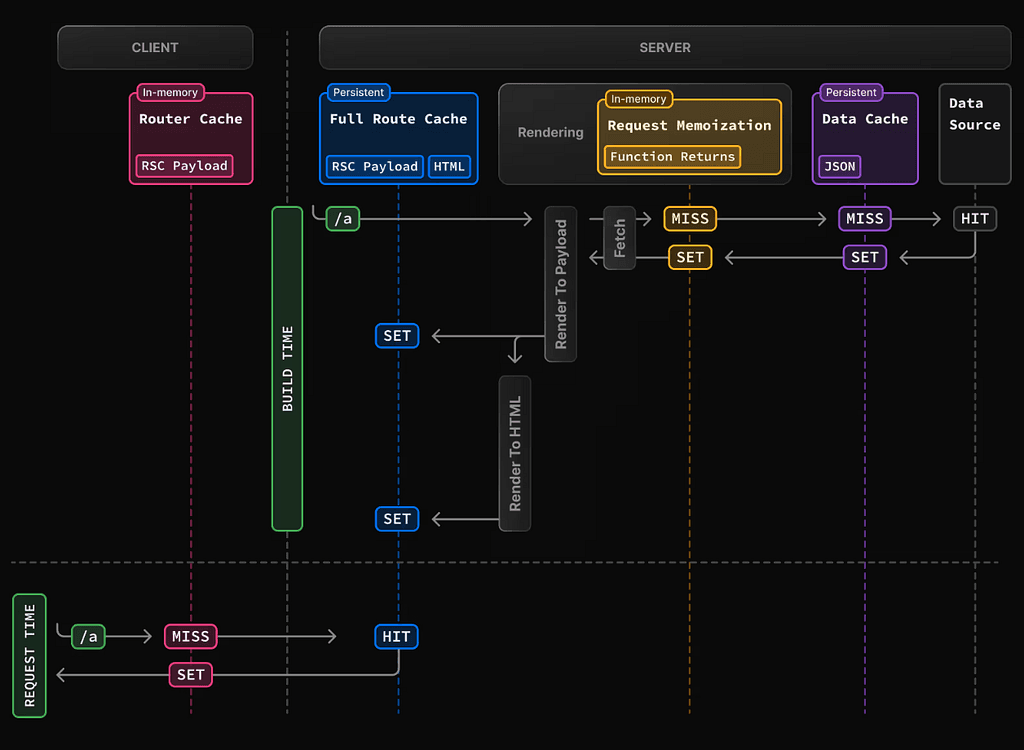
With the App Router, Next.js 15 offers an advanced caching system that caches content automatically. The goal: minimal duplicated work, low server cost and high performance.
Page-Level Caching
App Router files such as page.tsx and layout.tsx are rendered statically by default and cached on the CDN.
You can customize this with the dynamic and revalidate options:
export const dynamic = 'force-static'; // Default
// or
export const revalidate = 300; // Similar to Incremental Static Regeneration (ISR)
// or
export const dynamic = 'force-dynamic'; // Re-rendered on every request
Data-Level Caching with fetch()
In Next.js, fetch() is cache-aware. You can apply different caching strategies as needed:
force-cache:
await fetch('https://api.example.com/products', { cache: 'force-cache' });
- The first request goes to the server and the response is cached. Later requests are served from the cache.
revalidate:
await fetch('https://api.example.com/products', {
  next: { revalidate: 60 },
});
- The data is cached on the first request and refreshed in the background after 60 seconds. This follows the "stale-while-revalidate" strategy.
no-store:
await fetch('https://api.example.com/user/me', {
  cache: 'no-store', // Behaves like SSR
});
- Every request goes straight to the server. Caching is fully disabled.
Function-Level Caching
The cache() function and use cache:
Next.js offers function-level caching through the cache() function that ships with React 19. With it, IO-heavy functions can be cached.
Async functions called with the same arguments return the cached result instead of running again.
import { cache } from 'react';

const getProduct = cache(async (id: string) => {
  const res = await fetch(`https://api.example.com/products/${id}`);
  return res.json();
});
- The first call to
getProduct("123")performs the fetch. Calling it again with the same argument returns the cached result. This only runs on the server (React Server Components).
Things to keep in mind:
cache()can only be used in Server Components or Server Actions.- The arguments need to stay the same; otherwise it runs again.
- It is memory-based; it is not a shared cache across a distributed environment.
Caching with Route Handlers
In the App Router, route handlers (app/api/**/route.ts) behave like cache: 'no-store' by default and are not cached. Every incoming request runs the handler's code again.
Example: If you define an endpoint like /api/time that returns the current time, every page refresh returns a new value. Caching isn't active on this endpoint, and that's usually what you want.
// app/api/time/route.ts
export async function GET() {
  return Response.json({
    time: new Date().toISOString(),
  });
}
Next.js only offers caching for GET requests. Methods like POST, PUT and DELETE are never cached. Even with GET, caching is disabled in cases like these:
// For example request.headers, cookies and the like
const token = request.headers.get("Authorization");
- Helpers such as
request.headers,request.cookies,next/headersornext/cookiesautomatically mark a route handler as "dynamic", which means it re-renders on every request. So when designing a caching strategy, think carefully about how dynamic the data really is.
export const dynamic = 'force-static'
If the data in a route handler rarely changes (a list of categories, for example), full caching can be the better choice.
export const dynamic = 'force-static';

export async function GET() {
  return Response.json({
    time: new Date().toISOString(),
  });
}
- With this setting, the result of the handler's first run is cached.
- Every later request is served quickly from the cache.
- This is especially effective for reducing database queries and improving performance.
export const revalidate = <seconds>
export const revalidate = 60; // Works like Incremental Static Regeneration (ISR).

export async function GET() {
  const data = await fetchData();
  return Response.json(data);
}
💡 Note: Caching is not active in development (npm run dev). To see its real effect, test in production (npm run build && npm run start).
Automatic Cache Behavior with DynamicIO
In Next.js 15, if a component or route contains any async work (e.g. fetch(), a database query, readFile()), that content is automatically treated as dynamic. You can enable this with dynamicIO: true.
// next.config.ts
import type { NextConfig } from 'next'

const nextConfig: NextConfig = {
  experimental: {
    dynamicIO: true,
  },
}

export default nextConfig
While data is fetched at runtime by default, you can customize caching by caching specific parts of your app at the page, function or component level with use cache.
import type { NextConfig } from 'next'

const nextConfig: NextConfig = {
  experimental: {
    useCache: true,
  },
}

export default nextConfig

// Alternatively, dynamicIO: true/false controls the behavior.
If the 'use client' and 'use server' directives define where a component runs, 'use cache' lets you decide, with nothing more than a string literal directive, whether data comes from the cache or from runtime.
'use cache' can be applied to a function, a component or even an entire file.
// File level
'use cache'

export default async function Page() {
  // ...
}

// Component level
export async function MyComponent() {
  'use cache'
  return <></>
}

// Function level
export async function getData() {
  'use cache'
  const data = await fetch('/api/data')
  return data
}
How Does It Work?
- Cache key: In the App Router, the cache key for cacheable functions such as Server Components and Server Actions is made up of:
Cache Key = Build ID + Function Signature + Serializable Arguments
Deterministic caching: If a fetch(), server action or async component is called again with the same serializable arguments, the function doesn't run again; Next.js returns the cached response (behaving like SSG or ISR).
Non-serializable arguments: Arguments that can't be serialized, such as JSX (<Component />), children, functions and class instances, are not part of the cache key.
- Thanks to interleaving, though, they can still be used inside the function during rendering.
export default async function Layout({ children }: { children: React.ReactNode }) {
  const data = await fetch("https://api.example.com", {
    cache: "force-cache"
  });

  return (
    <div>
      <Sidebar />
      {children} {/* children isn't part of the cache key but is still rendered inside */}
    </div>
  );
}
cacheLifeandcacheTag, introduced in the Next.js canary, give developers real control over caching strategies.cacheLifelets you fine-tune cache lifetimes through predefined or custom profiles, whilecacheTagmakes it easy to invalidate specific cache entries on demand so data always stays fresh.
cacheLife
The cacheLife function defines how long a component or async function stays cached, when it is revalidated and when it expires completely.
import type { NextConfig } from 'next'

const nextConfig: NextConfig = {
  experimental: {
    dynamicIO: true,
    cacheLife: {
      blog: {
        stale: 3600, // 1 hour
        revalidate: 900, // 15 minutes
        expire: 86400, // 1 day
      },
    },
  },
}

export default nextConfig
Each profile defines stale (how long the browser may show old data), revalidate (how often it refreshes in the background) and expire (when it becomes fully invalid).
You can then import and call cacheLife inside the relevant function or component:
import { unstable_cacheLife as cacheLife } from 'next/cache'

export async function getCachedData() {
  'use cache'
  cacheLife('blog')
  const data = await fetch('/api/data')
  return data
}
cacheTag
Lets you tag a cached component or function, so data marked with specific tags can be revalidated or purged on demand.
import type { NextConfig } from 'next'

const nextConfig: NextConfig = {
  experimental: {
    dynamicIO: true, // enable it here
  },
}

export default nextConfig
In the App Router, cacheTag associates a cache entry with a data source and takes either a single string or a string[].
// app/data.ts
import { unstable_cacheTag as cacheTag } from 'next/cache'

export async function getProducts() {
  'use cache'
  cacheTag('products', 'homepage')
  const res = await fetch("https://api.example.com/data")
  return res.json()
}
Then you can invalidate the cache manually like this:
'use server'
import { revalidateTag } from 'next/cache'

export async function submit() {
  await doSomething()
  revalidateTag('products') // Purges caches tagged "products" and forces a refetch (works like ISR).
}
Conclusion
The new caching architecture in Next.js 15 provides a strong foundation for every use case, from large-scale projects to small apps. Even though they're experimental, directives like use cache, cacheLife and cacheTag directly improve both developer experience and app performance. The approach moves in step with the React Server Components architecture and lays solid ground for the web architecture of the future.
I hope this guide was useful. Happy coding! ☕💻
Originally published in Turkish on Medium.