When you build projects with Next.js, sooner or later you almost always need to send email: a contact form, a password reset, a notification to a user. While researching I came across plenty of services: Resend, EmailJS, Mailgun, SendGrid… Then the Nodemailer Node.js library caught my eye. It's simple to set up, free, fully under your control, and works directly with SMTP services like Gmail, which made it the better fit for me. So I wanted to try it.
I quickly built a small demo to test Nodemailer. In this post I want to share my experience and show, step by step, how to send email so you can easily do the same.
🛠️ What I Did First
I started by configuring my Gmail account, because Nodemailer needs some permissions to send email through Gmail.
Since I already use 2-step verification (if you don't, you'll need to turn it on in your account's security settings), I created an app password in my Gmail account. After choosing "Mail" as the app and "Other" as the device and giving it a name (for example: Nodemailer), Gmail gives you a 16-character password. We'll use it in our .env file, so make sure you note it down.

🔒 Installing Nodemailer and Setting Environment Variables
With Gmail sorted out, we can head back to the project. First, add Nodemailer:
npm install nodemailer
Then create a .env.local file in the project root and fill it in like this:
EMAIL_HOST=smtp.gmail.com
EMAIL_PORT=587
EMAIL_USER=yourgmailaddress@gmail.com
# The app password we just created
EMAIL_PASS=your_app_password_here
EMAIL_FROM_NAME="YourName or ProjectName"
📄 Sending Mail with a Server Action
We'll use a server action to take the data from the form and send an email with Nodemailer.
// app/actions/sendEmail.ts
'use server';

import nodemailer from 'nodemailer';

export async function sendEmail(formData: FormData) {
  const name = formData.get('name');
  const email = formData.get('email');
  const message = formData.get('message');

  // Define the mail transporter
  const transporter = nodemailer.createTransport({
    host: process.env.EMAIL_HOST,
    port: Number(process.env.EMAIL_PORT),
    auth: {
      user: process.env.EMAIL_USER,
      pass: process.env.EMAIL_PASS,
    },
  });

  try {
    await transporter.sendMail({
      from: `"${process.env.EMAIL_FROM_NAME}" <${process.env.EMAIL_USER}>`,
      to: process.env.EMAIL_USER,
      subject: `📬 New Contact Form Message - ${name}`,
      text: `
You have a new message:

👤 Sender: ${name}
📧 Email: ${email}

📝 Message:
${message}
    `,
    });

    return { success: true, message: 'Email sent successfully!' };
  } catch (error) {
    console.error('Error sending email:', error);
    return { success: false, message: 'Failed to send email. :(' };
  }
}
🔸 Note: This could also be done with an API Route. But with Server Actions I can handle the form data directly on the server, which removes the need to write an extra api/send endpoint. The code becomes more modular, simpler and tied directly to the form.
📄 Building the Form and Calling the Server Action
In my own demo I built the form with shadcn + React Hook Form + Zod, but here I wanted to keep the example simple:
// app/contact/page.tsx
"use client";

import { sendEmail } from "../actions/sendEmail";

export default function ContactForm() {
  // The Server Action is wired to the form's action prop
  async function handleSubmit(formData: FormData) {
    const result = await sendEmail(formData);
    alert(result.message);
  }

  return (
    <form action={handleSubmit}>
      <input type="text" name="name" placeholder="Your Name" required />
      <input type="email" name="email" placeholder="Your Email" required />
      <textarea name="message" placeholder="Your Message" required />
      <button type="submit">Send Email</button>
    </form>
  );
}
🧩 Testing It
We've built the form and wired Nodemailer up through a server action. Now it's time to test.
When we filled in the form and hit send, Nodemailer sent our email through Gmail SMTP in the background! No errors in the console, and the message arrived at the recipient address.
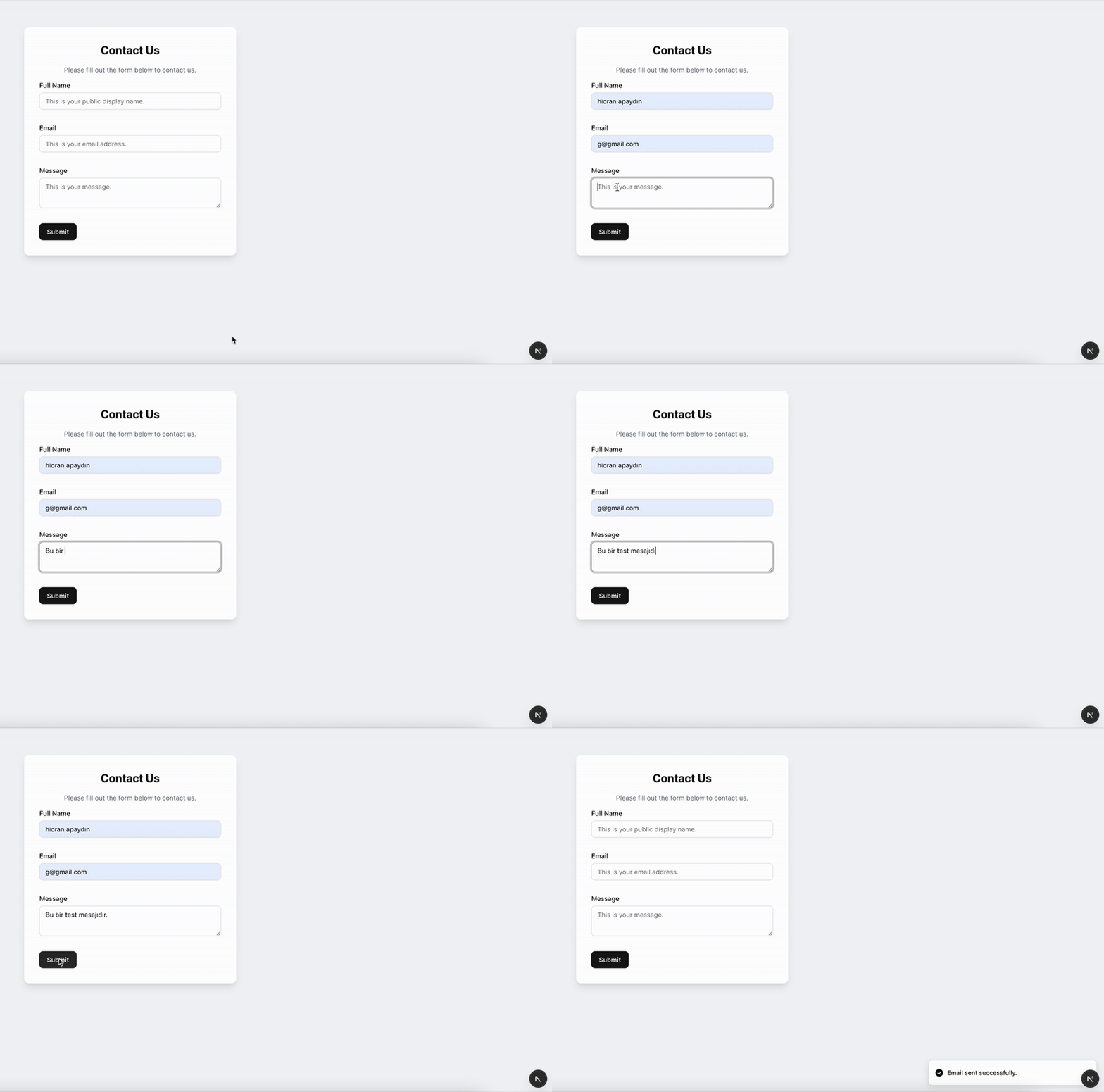
📦 And here's the email we received:
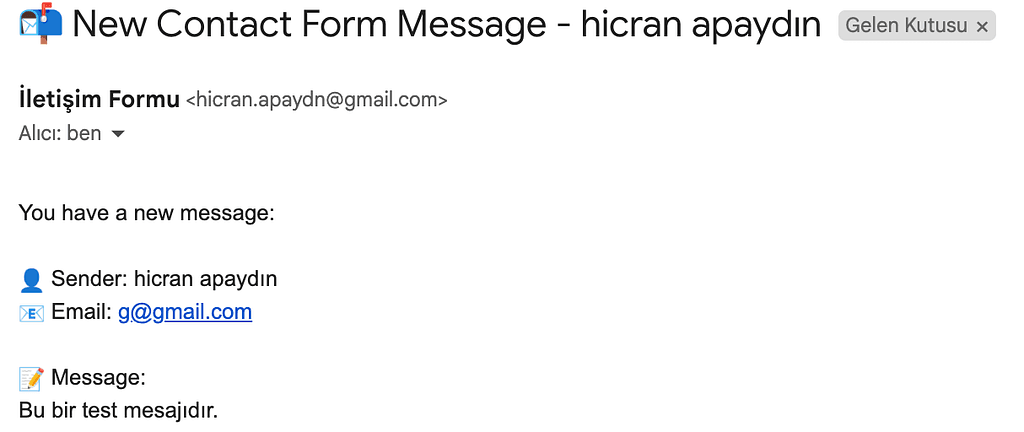
This simple test shows how quickly you can set up an email service with Next.js server actions and Nodemailer.
🎯 Conclusion
In this post we walked step by step through building a practical email system with Nodemailer on top of Next.js's modern architecture. Server actions let us keep the backend logic simpler and more readable.
The best part of this approach is that it's completely free. There's no need to buy a domain or sign up for a paid email service. You can integrate quickly with a common service like Gmail and get started right away.
The setup is also simple enough to be ideal for beginners, and a great way to learn the basics before moving to more complex infrastructure.
Larger projects or professional environments may call for other solutions, but for small apps and quick prototypes this approach is more than enough.
I hope this guide was useful. Happy coding! ☕💻
Originally published in Turkish on Medium.