Editing by Brayns AI
Managing user sessions is still a basic requirement for modern web apps. If you're looking for a stateless, cookie-based solution in particular, iron-session is a simple, secure and practical option. It also works well with server-side rendering (SSR). I built a small demo to try it out.
Traditional authentication libraries (next-auth, for example) integrate quickly with third-party services like OAuth, but their complex configuration, abstractions and limited customization can make it hard to keep a project flexible. Docs for alternatives like Auth.js can also be complicated, and they may not fully support newer Next.js features such as Server Actions.
On the other hand, service-based solutions like Clerk give you user management, MFA and social login out of the box, but they're paid and they tie your app to their infrastructure.
💭 Why iron-session?
If you want more control, a simple setup and no external services, iron-session stands out with its cookie-based, stateless and TypeScript-friendly design.
- It's cookie-based, so instead of sending the client a token like a JWT, it gives you server-side session management.
- It's stateless: session data lives only in the cookie, encrypted.
- It integrates nicely with TypeScript.
First, let's install the library:
npm install iron-session
To manage sessions with iron-session we need a shared configuration file. It defines how session data is written to the cookie and how it's encrypted.
Let's create lib/session.ts:
import { cookies } from "next/headers"
import { getIronSession, IronSession } from "iron-session"
import type { SessionOptions } from "iron-session"

export type User = {
  id?: number
  username?: string
  firstName?: string
  token?: string
}

export const sessionOptions: SessionOptions = {
  cookieName: "myapp_session",
  password: process.env.SESSION_SECRET as string,
  cookieOptions: {
    secure: process.env.NODE_ENV === "production",
    httpOnly: true,
    sameSite: "lax",
  },
}

export async function getSession(): Promise<IronSession<User>> {
  const cookieStore = await cookies()
  return await getIronSession<User>(cookieStore, sessionOptions)
}
iron-session needs a strong secret key to encrypt session data. Keep it in .env.local, and make it at least 32 characters long.
# .env.local
SESSION_SECRET=zkYEXAMPLEs3cretKey49281mkcxVXnalf0zq
Logging In with a Server Action: Sessions Backed by a Real API
The user's username and password come from the form and are sent to the DummyJSON API through a Server Action. On a successful login, the user's data is saved into the session.
✅ Technical notes:
- If the API responds successfully, the user's details (token, firstName, image…) are written into the session as an encrypted cookie.
- This data is only readable on the server; the client can't access it. That's what makes the setup secure.
// login.action.ts
"use server"

import { getSession } from "@/lib/session"
import { loginSchema } from "@/lib/validation"
import { z } from "zod"

export const loginAction = async (formData: z.infer<typeof loginSchema>) => {
  const res = await fetch("https://dummyjson.com/auth/login", {
    method: "POST",
    headers: { "Content-Type": "application/json" },
    body: JSON.stringify(formData),
  })

  if (!res.ok) {
    const errorData = await res.json()
    console.error("Login error from DummyJSON:", errorData)
    return { success: false }
  }

  const data = await res.json()
  const session = await getSession()
  session.token = data.accessToken
  session.firstName = data.firstName
  await session.save()
  return { success: true }
}
📄 A login form that calls this server action and redirects to a protected route (/dashboard) after logging in:
"use client";

const LoginPage = () => {
  // form (useForm), router (useRouter) and error state omitted for brevity

  const onSubmit = async (values: z.infer<typeof loginSchema>) => {
    setError("");
    try {
      const response = await loginAction(values);
      if (response.success) {
        router.push("/dashboard");
      }
    } catch (err) {
      setError("Something went wrong");
    }
  };

  return (
    <form onSubmit={form.handleSubmit(onSubmit)} className="w-full space-y-6">
      {/* username and password fields */}
    </form>
  );
};

export default LoginPage;
After logging in, the user is redirected to /dashboard. Only users with a valid session can access this page. Blocking unauthorized access is easy: just check the session with iron-session.
const DashboardPage = async () => {
  const session = await getSession();
  // Without a token, the user is sent to the login page
  if (!session?.token) {
    redirect("/login");
  }

  return (
    <>
      <h1>Hello, {session.firstName}</h1>
      <form action={logoutAction}>
        <Button type="submit">Logout</Button>
      </form>
    </>
  );
};

export default DashboardPage;
🍪 Where Is Session Data Stored?
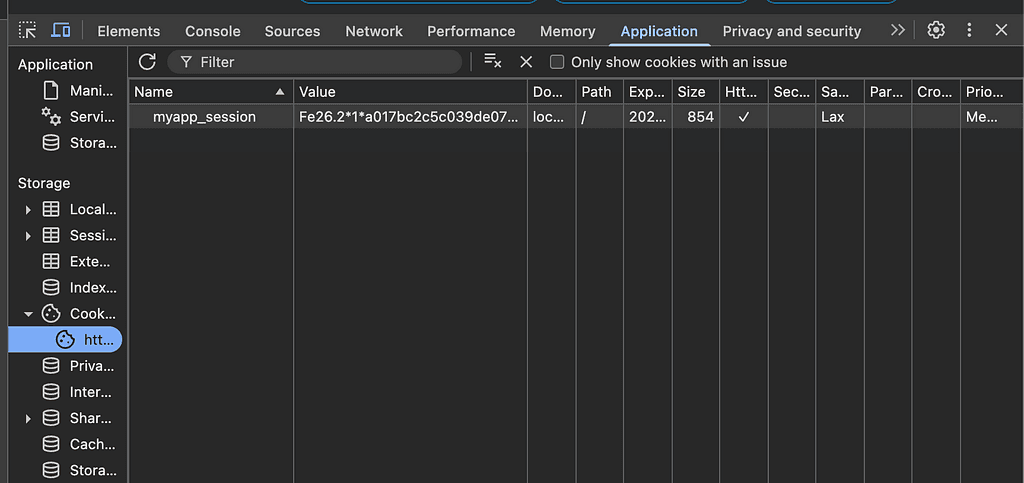
iron-session writes session data to the browser not as a readable token like a JWT, but inside an encrypted cookie. So all of the session data shows up in the browser under Application → Cookies.
There's an important difference, though:
- The cookie doesn't hold raw data; it holds a string encrypted by iron-session, so it can't be read or tampered with from outside.
- You can't read this value directly in the browser; only the server can decrypt it, using the password you configured.
- So even though it looks like data is stored on the client, all of the control and security stays on the server.
🔐 Ending the Session (logoutAction)
To log the user out, we created a simple but effective server action.
- If you want to keep some session data and only reset the token, something like
session.token = undefineddoes the job. - For a full logout, though,
destroy()is always the safer, cleaner option.
"use server";

import { getSession } from "@/lib/session";

export const logoutAction = async () => {
  const session = await getSession();
  // session.token = undefined
  session.destroy();
};
🔐 Managing Access and Refresh Tokens
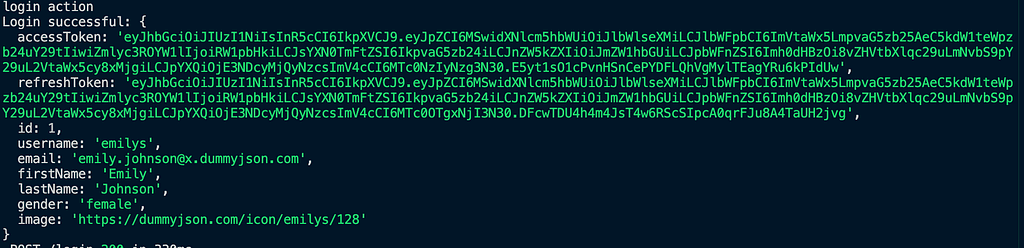
One more point I want to touch on briefly: access tokens and refresh tokens. An access token authenticates the user and is short-lived. A refresh token is used to get a new token once the access token expires. iron-session improves security by storing these tokens encrypted in the browser while keeping them managed on the server. That lowers the risk of data leaks and token theft, and users don't have to log in over and over.
Conclusion
Managing user sessions securely and simply is easy with iron-session. It improves security while keeping your app efficient. For streamlining authentication and authorization, solutions like iron-session offer a fast, effective approach. You can find the details in my GitHub repo.
Happy coding 👨💻 🎉
Originally published in Turkish on Medium.